Refund
Guide to understanding the refund policy and refund eligibility requirements.
1. Refund Policy
-
The Platform supports refunding all available remaining balances in the Platform account at the time a client requests a refund, provided there is a reasonable reason and no suspended ad accounts.
- If your ad account is still active (not suspended), you should turn off all campaigns and withdraw the remaining funds back to your Platform balance after 3 hours from the time the campaigns are paused.
-
All incurred costs when using the Platform's services will not be refunded.
-
The Platform refunds 100% of the amount only if the customer has not yet been granted a TikTok Ads account.
-
The Platform supports refunds only to the payment methods (including accounts/cards/wallets/...) previously used by clients to add funds, in order to protect account holder benefits and ensure payment security.
Please note that:
-
For TikTok Ads spam or suspicious violations resulting in suspended ad accounts, the Platform supports refunding the available remaining balance only if the client advertised approved content (the advertised URL or video was submitted for review and approved on the Platform). Cases involving unapproved content will not be eligible for a refund of the available remaining balance due to intentional policy violations.
-
In the event of a suspended ad account, the Platform team will review the advertising history, account data, and client behavior before making a final decision regarding the refund request.
-
The Platform cannot support refunding the available remaining balance from suspended ad accounts if the ad account is penalized (suspended) for any reason related to TikTok policies.
-
Below are some common reasons that may lead to ad account suspension, for which refunds cannot be guaranteed:
- Deploying products or services without obtaining prior approval from the Platform.
- Running prohibited products or services, such as weight loss, endocrine, sexual health, breast augmentation, MLM, financial services, gambling, and similar restricted categories.
- Advertisers engaging in spam or other malicious activities.
- Altering landing page content, using landing pages featuring individuals wearing badges, doctors, or third-party logos, or using redirect links that violate unauthorized product guidelines.
- Users associated with ad accounts that have a history of policy violations, attempt to evade platform controls, or intentionally fail to pay advertising expenses may have their accounts suspended without eligibility for refunds.
- Violating TikTok's policies: https://ads.tiktok.com/help/article/advertising-on-tiktok-first-things-to-note
2. How to request a Refund
Step 1:
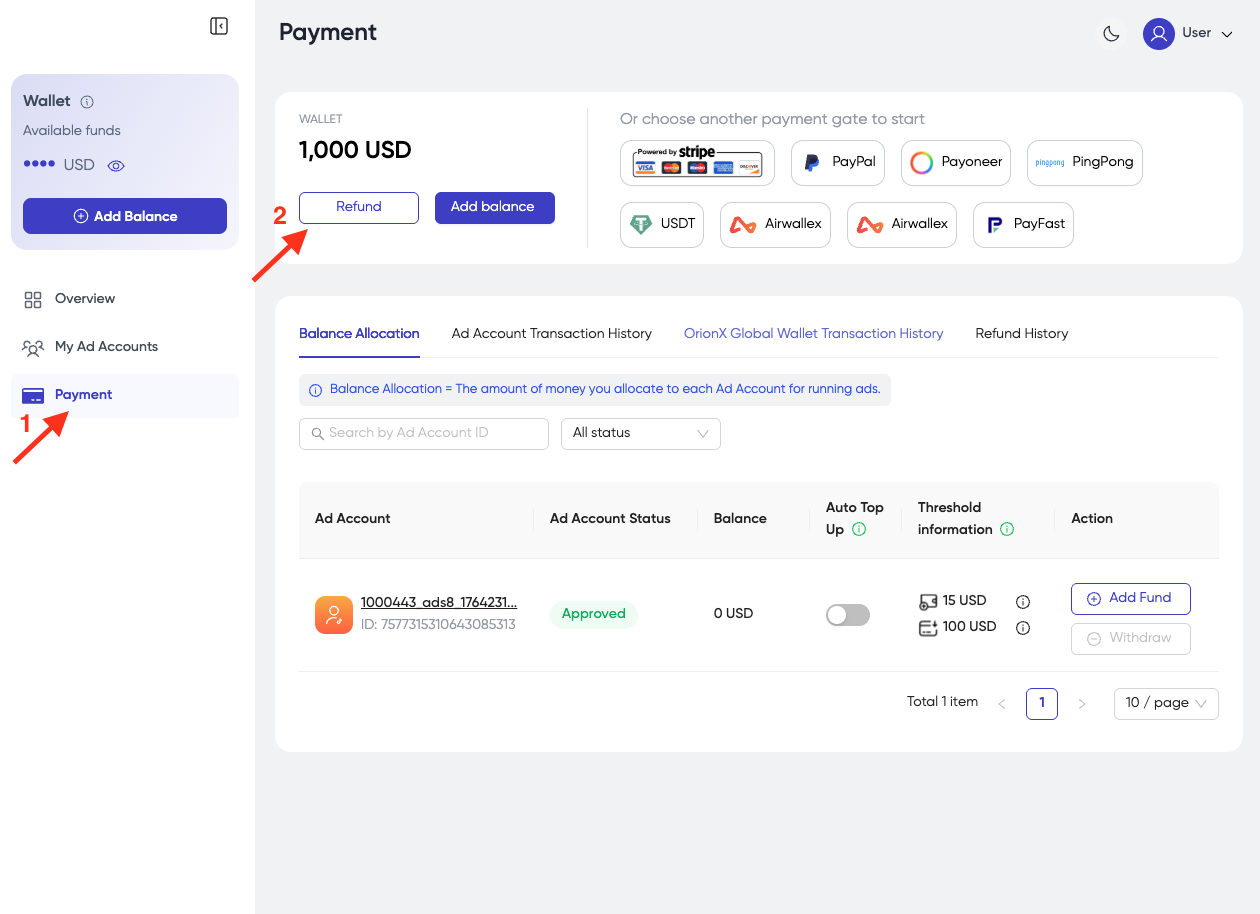
- In Payment tab, click Refund button.
Step 2:
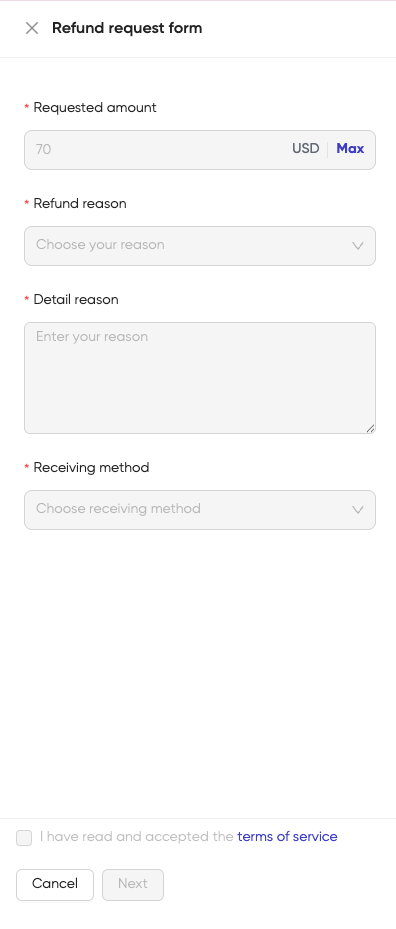
- Fill out all the required information on the Refund Request Form.
-
Requested amount: Enter the amount you want to refund. The request amount should not exceed your Platform balance. Click "Max" to choose the maximum amount you can request for a refund.
-
Refund Reason: select one of the following reasons:
- Permanent service discontinuation
- Temporarily stop using services
- Other
-
Detail reason: Please provide a detailed reason why you want a refund.
-
Receiving method: Please choose the same payment method as the one you used to deposit and fill in the accurate payment details:
- Credit Card
- Payoneer (Payoneer email)
- USDT (Wallet address, USDT network)
-
Tick the box "I have read and accepted the terms of service."
-
Click Next.
In case you choose the reason "Permanent service discontinuation" and you still have money in the ad account, it will display as follows:
-
Click Skip if you want to proceed with the refund process.
-
Click Go to withdraw money: you will withdraw money from the ad account to the Platform account. After that, you will need to start the refund request process from the beginning again.
Step 3:
-
Carefully review your refund request. We will not be responsible if you provide incorrect information about the receiving method.
-
Click Submit.
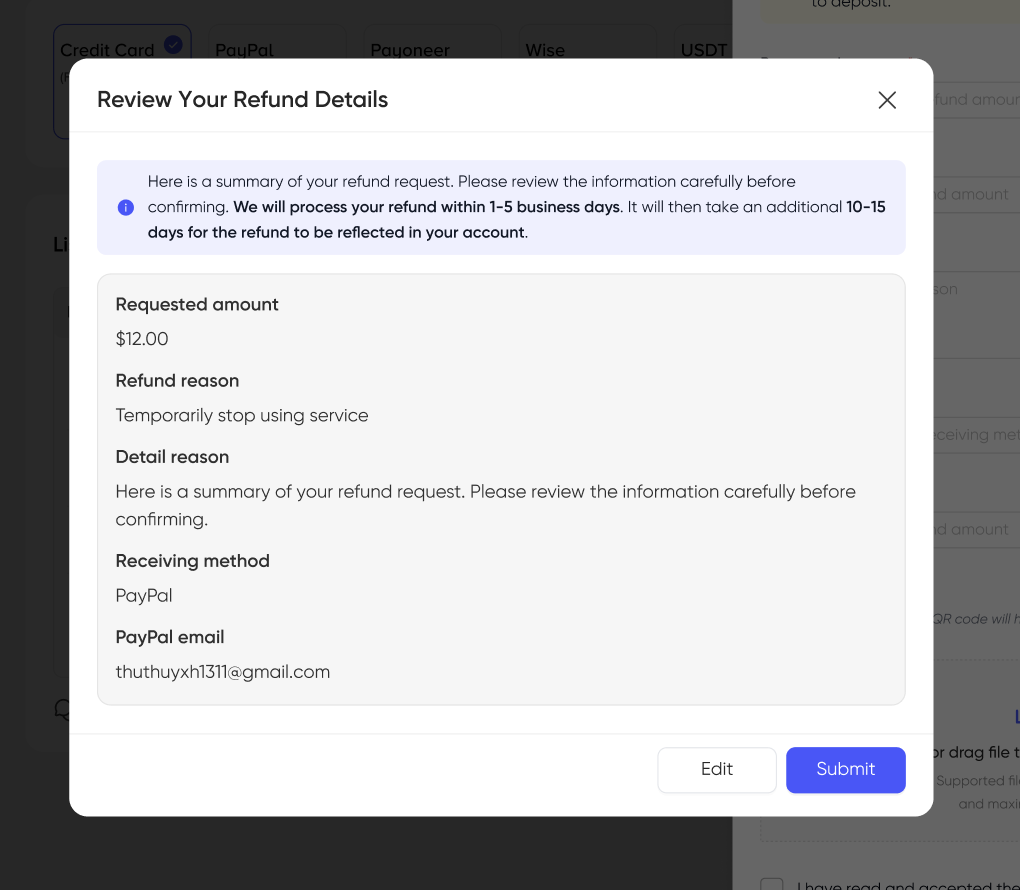
- Your refund request has been sent successfully.
-
We will process your refund within 1–5 business days. It will then take an additional 10–15 days for the refund to be reflected in your account.
-
The user will be responsible for any transaction fees.